
Command Line Tools
Quick Navigation:
I often use the linux command line, it’s a great tool for quickly messing around with files, and there’s a lot of really handy tools that just have command line interfaces, because of how easy it is to make command line interfaces.
Futzing around with the terminal also gives you opportunities to develop opinions on how you like it to look, and find ways to make it look neat.
This document is mostly just for my own reference in case I forget things and want to reference back on stuff, but I enjoy looking at how other people do things because it lets me see if I like anything and consider taking inspiration, so you’re welcome to see how I like to do things!
My current terminal setup
(I’m currently getting really into some new colours so I hope to very clumsily make my own more colourful color scheme in the future).
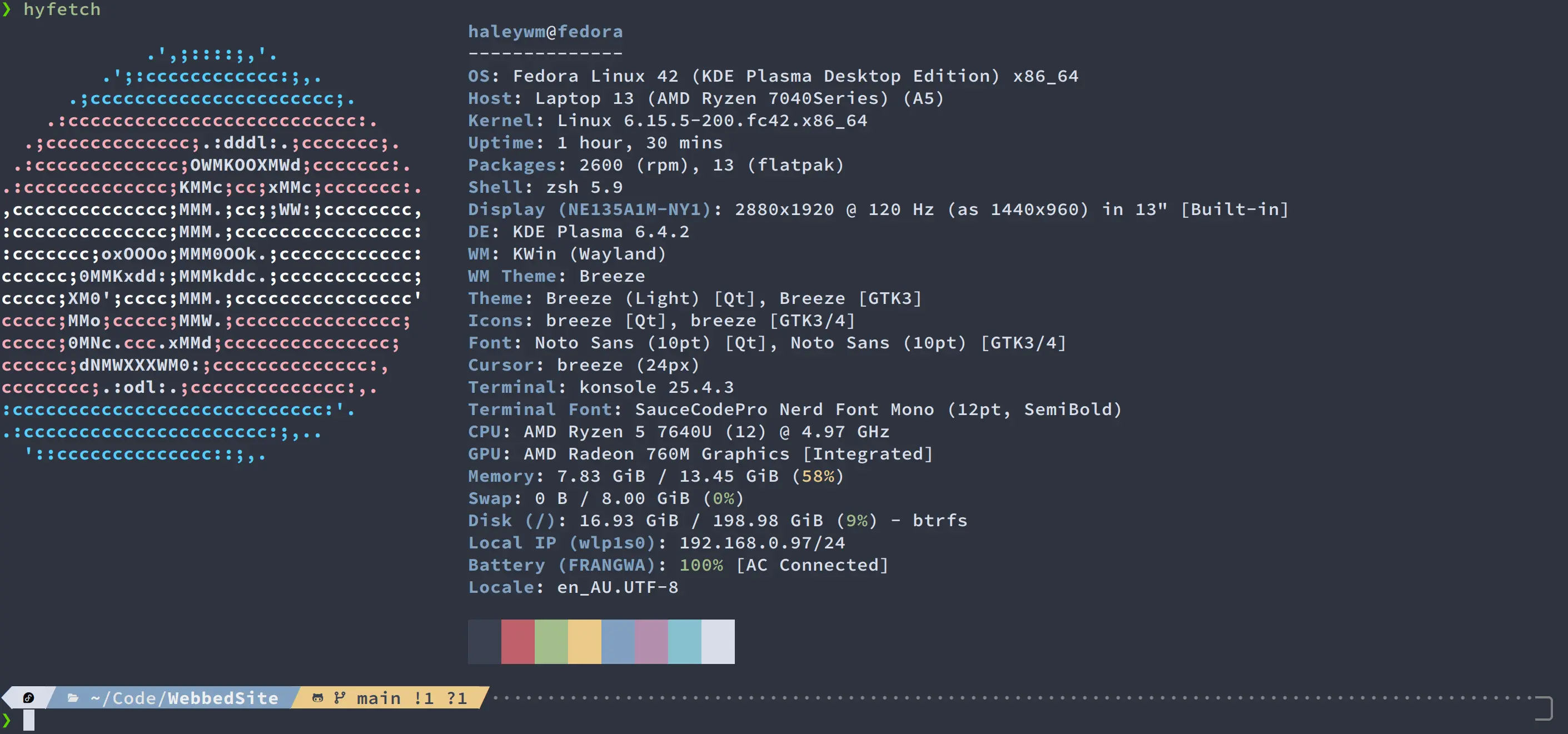
The setup that I’ve used for the last few years starts with the Nord colour scheme. It’s a lovely mix of dark blues with some lighter colours that I really enjoy. I like mixing it with the Source Code Pro/SauceCodePro font as remixed by Nerd Font, which lets it work nicely with my next tool.
Powerlevel 10K is a fun theme for the zsh shell that I love to use because it’s really customizable, and lets me get these really sexy multi-coloured bars that hang around for just one command, with fun little icons and different angles that you can choose from.
The ZSH shell is an adjusted shell that still maintains backwards-compatability with the bash shell, which adds on additional features and functionality. In practice the main thing that people use it for is to be able to access fun features like plugins! I personally like to use the antigen plugin manager, because it’s the easiest to use and install that I’ve been able to find, paired with zsh-autosuggestions and zsh-syntax-highlighting, which both give really nice additions that make it much easier and faster to use my terminal, by adding suggestions based on commands I’ve typed in the past, and highlighting my commands in different colours to make them look nicer, and be easier to read as the different parts are highlighted in different colours.
I don’t use the command line for programming, although from what I hear if you enjoy that style, neovim is apparently really customisable. I’ll try to do a separate page on that down the line.
Useful Command Line Tools
There’s several useful tools that I am constantly using.
vim- Command line text editor. To be honestly I don’t really know any of the actual fancy commands beyond using
ito enter edit mode,dwordlto delete words or lines, and:wqto write when I’m done. I had to use this in uni and unless you want to learn a whole bunch of fancy commands and become very powerful it’s probably easier to just usenano.
- Command line text editor. To be honestly I don’t really know any of the actual fancy commands beyond using
git- Git takes a bit to learn, although graphical clients (that are free if you’re a student) like Gitkraken can help while you’re in the learning stage. It’s worth it, though, because it gives you a really nice way to look at all the previous versions of your project, and grab individual files when you need to.
tree- View the entire directory structure of the thing you’re in, although be careful not to accidentally include a python env file or something that spits out 10,000 lines of random gunk you don’t need to see.
ls -lah- Default installed tool with some additional arguments, but this lists the contents of the files, with the file permissions and the file size, and converts the file size into kb/mb/gb.
magick- Command line image manipulation tool, short for ImageMagick. This one I’ve only started using recently when I’ve started making a website, but it’s great for converting images to the webp format, which, as much as it gets hate, is a great format for the web because it has a lot of good, lossless, compression built in. It also supports lossy compression for further efficiency, and animation.
- My cheatsheet of useful:
-
magick image.png image.webp- Convertimage.pngintoimage.webwith the default settings, meaning lossy compression. Most of the time this is fine, because you generally can’t see the difference, but it’s a lot smaller. Add the-qualityargument (takes a number 0-100, default 100) in between the input and output to turn the quality down further if you need the image to be smaller. See the resize argument below for an alternate method of reducing file size. -magick image.png -define webp:lossless=True image.web- True lossless conversion. I had to do this for images that have straight diagonal lines that became blurry with lossy compression. -magick input.gif -coalesce -repage 0x0 -crop WxH+X+Y +repage output.webp- Taken from Stackoverflow, this lets you convert a gif and crop it. Useful because magick doesn’t like cropping animated images but this specific recipie helps. -magick image.png -auto-orient -resize 1000x1000 -strip image.webp- Takes an image, rotates it if needed (Often when you take a picture with a camera, the image will always be rotated one way, and there’s an EXIF tag that specifies that it should be rotated. This EXIF tag is often ignored by browsers.). the image is then resized so that the largest dimension between width or height becomes 1000 pixels, and then the EXIF data is removed to ensure that there’s no sensitive data left. I use this for processing pictures from my camera for the web. -magick identify -verbose image.png- Gives you all of the hidden information about an image, great if you want to check to make sure there’s nothing sensitive secretly present. Leaving out the-verboseargument gives you some short and simple details like the image resolution, format, and colour depth.
Fun Command Line Tools
I couldn’t easily find a list of fun command line programs, so here’s my list of fun tools:
hyfetch- Github. Contains a built-in continuation of neofetch, as well as supporting alternative tools like fast-fetch. Adds on support for displaying pride flags on your fetch output. Fetch tools show this info like my above screenshot, where they show off your OS, and lots of quick details about your setup.
cbonsai- Github. A lovely little bonsai tree generator in your terminal :)
pipes.sh- Github. Another fun terminal visualiser.
cmatrix- Make your terminal look like that fun text render from the matrix.
cava- Github. I don’t use this anymore but during my tiling phase in uni this looks lovely while you’re playing music.
cool-retro-term- Github. This is a full terminal emulator and not a tool but it looks really fun.
sl- Steam locomotive. Makes a train drive across your screen if you accidentally type
lswrong.
- Steam locomotive. Makes a train drive across your screen if you accidentally type
gti- Same as above, but a mispelled git car.
cowsay- Make a cow say whatever gets piped in to this command. Often used with
fortune, but I kind of think that a lot of those fortunes have aged poorly so I won’t recommend that.
- Make a cow say whatever gets piped in to this command. Often used with
lolcat- Make the piped input rainbow coloured.
asciiquarium- An aquarium running inside your terminal.